
HELP / GET STARTED
GUITAR, the MIDI guitar
Where the Complete Chain Instrument installs, why GUITAR is not in the standalone app or the effect, and how to load it on an instrument track.
GUITAR is a VST3/AU instrument: a modelled 6-, 7- or 8-string guitar you play from MIDI. It is the first stage of the Complete Chain Instrument and plays straight into Lifeblood, Monolith, Revenant, Spectre and Aftermath. It comes only with the Complete Chain, and your Complete Chain code or trial activates it.
Nothing extra to install
The Complete Chain AU + VST3 download installs two plugins at the same time: JediPalm Complete Chain, the effect for your own guitar, and JediPalm Complete Chain Instrument, the same chain with GUITAR in front of it. There is no separate GUITAR download or installer.
Where GUITAR appears
Only when you load JediPalm Complete Chain Instrument as an instrument in your DAW. The standalone app is the chain for your own guitar, and JediPalm Complete Chain on an audio track is the effect: neither has a GUITAR tab.
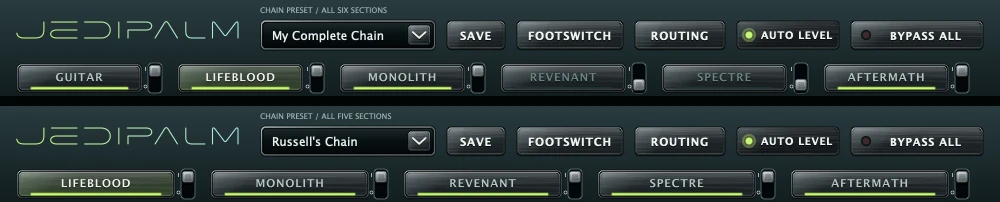
- 01
Make an instrument track
In Logic Pro, a Software Instrument track. In other DAWs, an instrument or MIDI track, not an audio track.
- 02
Load the Instrument
Logic Pro: AU Instruments › JediPalm › JediPalm Complete Chain Instrument. Other DAWs: the VST3 named JediPalm Complete Chain Instrument.
- 03
Play
Play a MIDI keyboard or a MIDI region. The GUITAR tab comes first; the five plugin tabs after it work as they do in the effect.
Keyswitches and DAW maps
Keyswitches C-2 to B-2 choose the articulation. By default, velocity chooses palm mutes, open notes and, at 127, a pinch harmonic. The installer puts maps for Logic Pro and Cubase in /Library/Application Support/JediPalm/chain/Documentation/DAW Maps, so articulations show by name. Logic Pro: copy JediPalm Guitar.plist into ~/Music/Audio Music Apps/Articulation Settings and choose it from the track’s Articulation Set menu. Cubase: open Expression Map Setup and import JediPalm Guitar.expressionmap.
Windows
The Windows VST3 of the Instrument comes with the next Windows update of the Complete Chain, free for every owner. Until then GUITAR plays on the Mac.