TAP / AMP CHANNELS
Out of the box, switches A to D pick Monolith’s four channels the moment they go down: CH1 Clean, CH1.5 Blues, CH2 Heavy and CH3 Metal. That is bank 1, shown as 000 to 003 on the pedal.

COMPLETE CHAIN / M-VAVE CHOCOLATE
The M-Vave Chocolate is a wireless four-switch MIDI footswitch, and the Complete Chain works with it straight out of the box. Change Monolith’s channel, step through your saved chains and swell Spectre with an expression pedal, with both hands on the guitar.
COMPLETE CHAIN 3.2.0 · STANDALONE, AU + VST3 · MAC + WINDOWS
HOW IT WORKS
The Complete Chain opens the pedal itself, so it works the same in the standalone app and in your DAW.
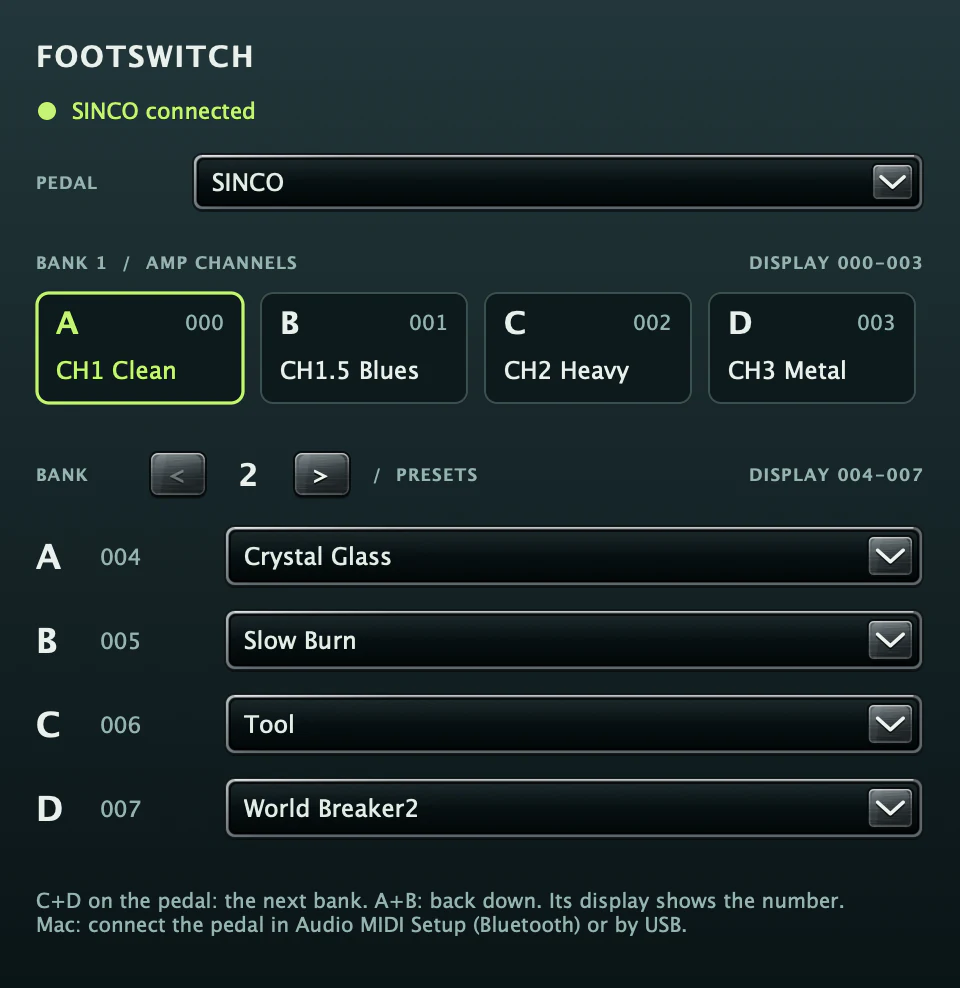
Out of the box, switches A to D pick Monolith’s four channels the moment they go down: CH1 Clean, CH1.5 Blues, CH2 Heavy and CH3 Metal. That is bank 1, shown as 000 to 003 on the pedal.
Press C and D together for the next bank, and A and B together to go back. From bank 2 up, each switch loads one of your saved chains, four to a bank, with the number on the pedal’s display.
Pick the chain on each switch in the FOOTSWITCH panel. Leave a switch empty and it follows your PRESETS menu in order: bank 2 takes the first four, bank 3 the next four.
Plug an expression pedal into the Chocolate’s EXP jack and set Spectre’s AUTO to PEDAL, and your foot rocks the treadle for swells or the PHANTOM wah. Spectre listens for CC 11, or click EXP and move the pedal to learn another.
SETUP
Four steps, about two minutes, once per computer.
Charge the Chocolate over USB-C, then switch it on. On a Chocolate Plus, set the interface switch to U, its position for a computer.
Mac: open Audio MIDI Setup, choose Window › Show MIDI Studio, click Bluetooth and connect the pedal, or plug it in with a USB-C cable. Windows: use the USB-C cable.
Open the Complete Chain and press FOOTSWITCH in the toolbar. PEDAL starts on Any M-Vave pedal and finds it by itself. Over USB the pedal calls itself SINCO, after its chip.
Tap a switch to change channel. Put a chain on each switch from bank 2 up, then step through them with C and D. The setup is saved for the whole computer.
WHERE TO BUY
M-Vave sells it through its own brand store. These are plain links, and we earn nothing from them.
THE ONE WE TEST WITH
Four switches, Bluetooth MIDI and USB-C, a rechargeable battery and an expression pedal jack. It adds switchable banks with the number on its display, which is how the Complete Chain reaches your saved chains, and a MIDI host port for hardware.
CHOCOLATE OR PLUS?
Both have four switches, wireless MIDI, an expression jack and a battery that lasts about twelve hours. M-Vave lists switchable banks and the MIDI host port on the Plus alone.
Without banks, the original Chocolate would reach Monolith’s four channels at most, not your saved chains, and we have not tested it. Buy the Plus. Check that the listing names the Chocolate Plus and that M-VAVE is the brand.
M-VAVE AND CHOCOLATE ARE TRADEMARKS OF THEIR OWNER. JEDIPALM IS NOT AFFILIATED WITH M-VAVE, WHICH SELLS AND SUPPORTS THE PEDAL.
GOOD TO KNOW
Yes. The Complete Chain opens the pedal itself instead of waiting for MIDI from the DAW, so the switches work in the standalone app and as an AU or VST3. That includes Logic, which sends no MIDI to effect plugins.
Yes, over USB. We have not tested Bluetooth MIDI on Windows yet, so connect the pedal with its USB-C cable there.
The Chocolate Plus. It is the model we built and tested the support on, and M-Vave lists switchable banks as a Chocolate Plus feature, which is how the Complete Chain reaches your saved chains. We have not tested the original Chocolate.
PEDAL lists every MIDI input on the computer, so you can pick another one. It needs to send Program Change 0 to 3 for the amp channels, and 4 and up for the banks of chains.
Footswitch support is part of the Complete Chain. On its own, Spectre takes an expression pedal as MIDI from your DAW, and Lifeblood’s looper answers the arrow and page keys that page-turner pedals send.
No. It is one setup for the whole computer, so the same switch loads the same chain whichever preset is open. The trial includes the footswitch support too.
YOUR ENTIRE RIG. ONE PURCHASE.
Footswitch support comes with the Complete Chain, for every owner and every trial.
ONE PAYMENT · LIFETIME LICENCE · NO SUBSCRIPTION · NO AUTOMATIC CHARGE